
Smart Print Queue
No more customer files on your WhatsApp: customers scan a QR, upload, pay by UPI and get a token.
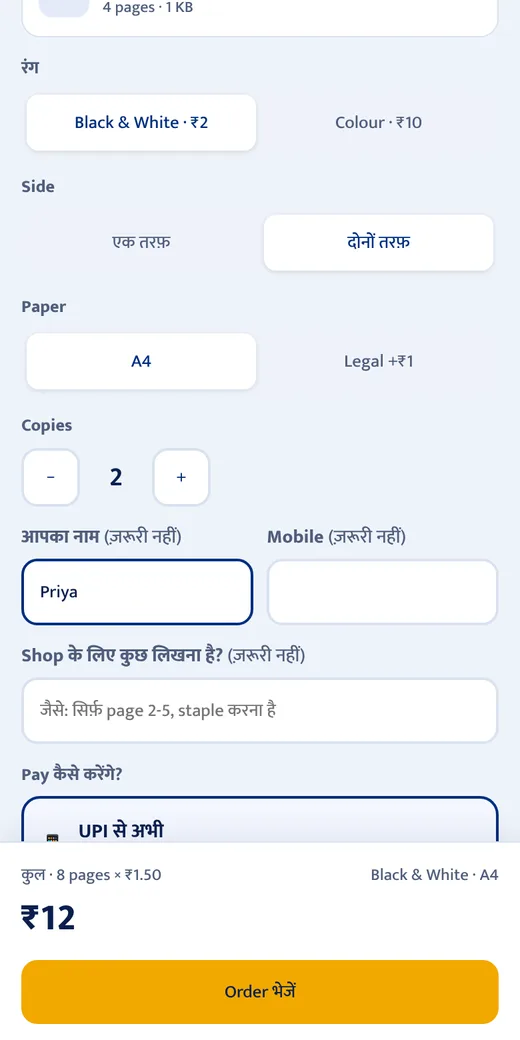
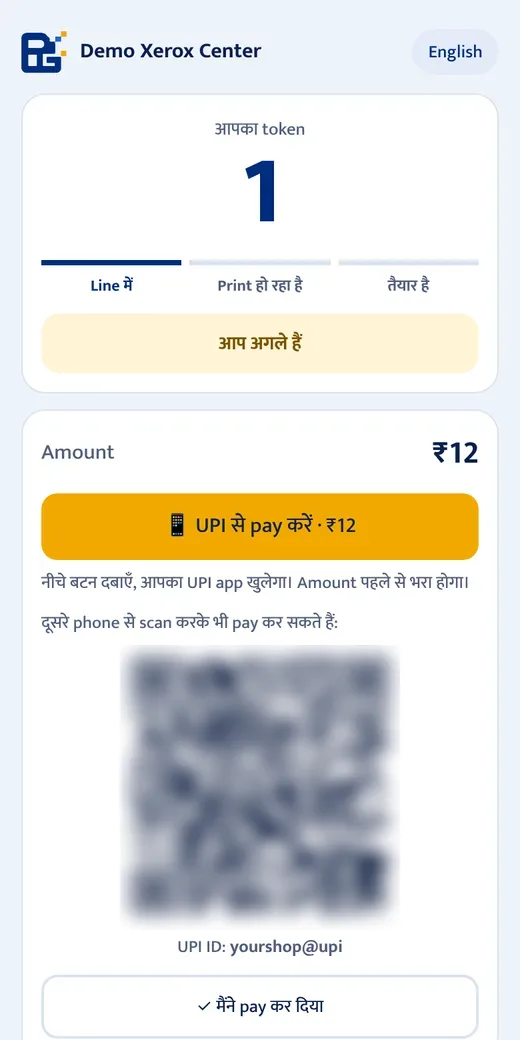
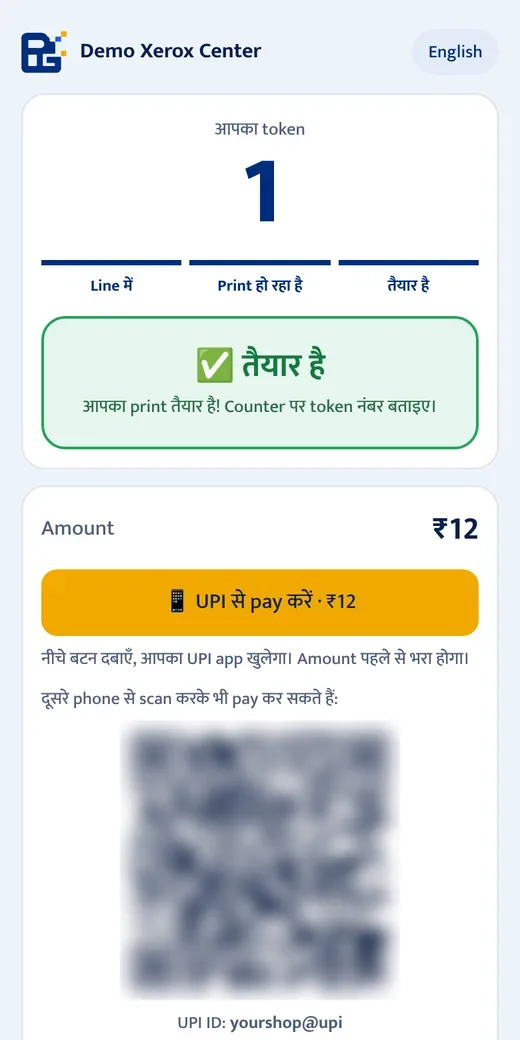
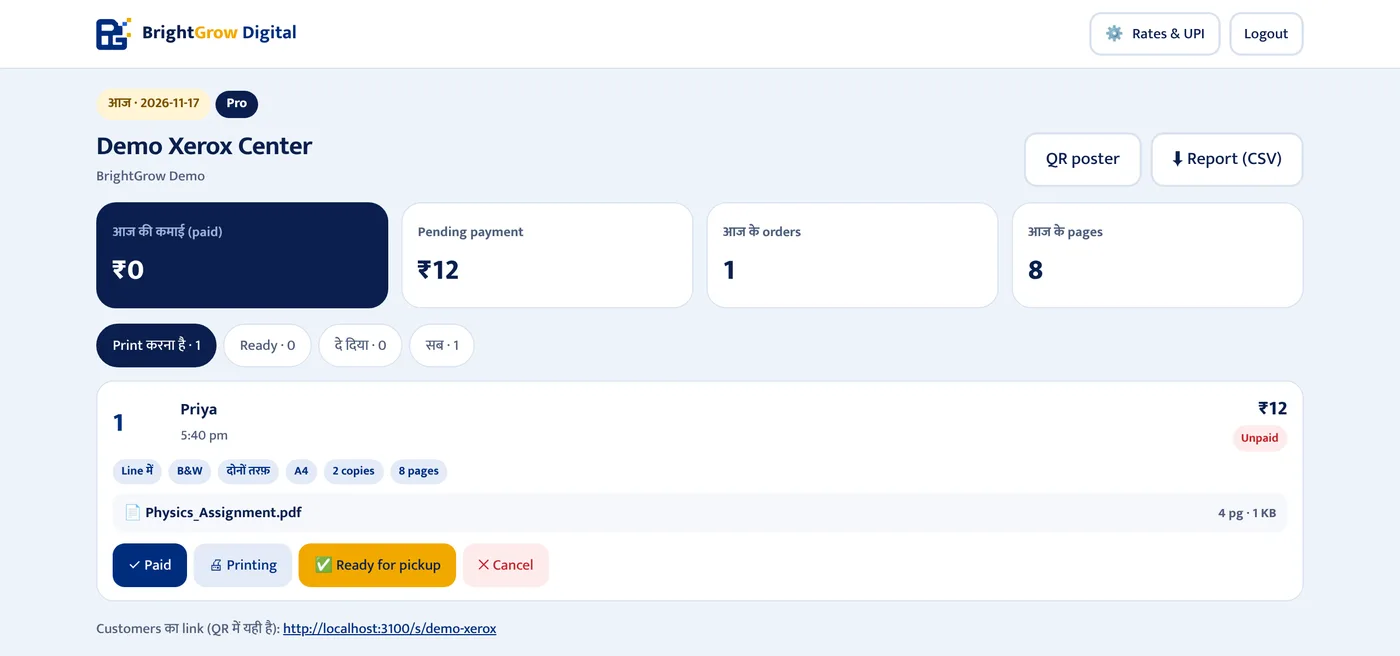
Customers scan the QR at your counter, upload their file and choose B&W or colour, single or double side, paper size and copies. The price is worked out from your rates, they pay to your UPI ID and get a token number. You see the order on your dashboard, print it and press “Ready for pickup”; their phone shows it straight away.
- Setup in 1 day
- 14-day free trial
- No app for customers
- UPI to your own account
The problem
A normal day, without and with Smart Print Queue.
- 9:00 am
Today:Students send files to your personal WhatsApp. Forty chats, mixed with family messages.
With it:Files come in through your QR page, each order with its own token number.
- 11:00 am
Today:The same questions at the counter: colour or B&W? single or double? how many copies?
With it:Customers choose the options on their phone and see the price before they pay.
- 1:00 pm
Today:Three copies printed instead of two. Paper, ink and an argument wasted.
With it:Copies, sides and paper size are written on the order. You print exactly that.
- 7:00 pm
Today:Matching UPI screenshots to customers: who paid, who didn't?
With it:Each order shows Paid or Unpaid, and today's earnings are on the dashboard.
The cost
How much time do files and questions cost you?
Put in your own numbers. This counts only the time spent finding files, answering print questions and checking payments.
26 working days a month. The starting numbers are only an example; move the sliders to your own. This is an estimate from your numbers, not a promise.
52
hours
a month go on files, questions and payment checks
≈ 6.5 full working days
The fix
How it works.
- 01
Put up the QR poster
Print it from the dashboard and stick it at the counter.
- 02
Customer uploads the file
PDF, photo or Word file, up to 25 MB. PDF pages are counted automatically.
- 03
Chooses options and pays
B&W or colour, sides, A4 or Legal, copies. The price shows instantly; they pay by UPI or choose cash at the counter.
- 04
Token and live status
They get a token number. When you press “Ready for pickup”, their phone shows it.
Why Smart Print Queue
What changes for you.
Your WhatsApp stays personal
Customers send files through your QR page, not to your phone number.
No more wrong prints
Colour, sides, paper and copies are chosen by the customer and written on the order.
Money you can see
Payments go to your own UPI ID. Every order shows Paid or Unpaid; the day's total is one glance away.
Ready for the exam rush
Orders line up by token number and customers wait outside until their phone says Ready.
See it in use.
Screens from the real app.
Your options
Compared with what you use today.
Files without sharing your personal number
- Smart Print Queue
- Yes
- WhatsApp and the counter
- No
- Big print-shop software
- Varies
Price shown before printing
- Smart Print Queue
- Yes
- WhatsApp and the counter
- No
- Big print-shop software
- Yes
Token order and live status on the customer's phone
- Smart Print Queue
- Yes
- WhatsApp and the counter
- No
- Big print-shop software
- Rarely
No app download for customers
- Smart Print Queue
- Yes
- WhatsApp and the counter
- Yes
- Big print-shop software
- Often needs an app
Setup time
- Smart Print Queue
- 1 day, done by us
- WhatsApp and the counter
- None
- Big print-shop software
- Weeks
Cost
- Smart Print Queue
- Low monthly fee, ask us
- WhatsApp and the counter
- Free, but costs your time
- Big print-shop software
- Much higher
Why buy from us
Software is half the job. We do the other half.
We set it up for you
Your account, your starting data and a 15-minute staff training, done in one day. You don't configure anything.
A real person on WhatsApp
Support comes from the team that builds the product, in Hindi or English. No ticket queue.
No lock-in
No long contracts. If it stops being useful, you can stop anytime.
Made for Indian counters
Hindi-first screens, works in any phone browser, built for small teams and busy days.
Your data stays yours
Only your account can see your customers' details. We don't sell or share them, and each product page says how long data is kept.
Built with you
Small products, improved from what owners tell us. Features marked coming soon are added as they launch.
Try it free for 14 days.
We set it up and train your staff. Use it on real customers for two weeks. No card, no contract. If it doesn't fit, you simply stop.
Plans.
Four plans per shop. Book a free demo and we'll share the price for the plan that fits you.
Basic
For small shops
- Up to 60 online orders a day
- QR upload, live price and token
- UPI to your own UPI ID, or cash
- Order dashboard and today's earnings
- QR poster and setup help
Plus
For busy shops
- Everything in Basic
- Up to 200 online orders a day
- CSV order report
- Priority WhatsApp support
Pro
For shops near colleges and offices
- Everything in Plus
- Unlimited online orders
- Auto-print to the shop's printerComing soon
- Payment gateway with automatic payment confirmationComing soon
Custom
For print chains, CSC networks or special workflows
- Everything in Pro
- Several counters or branches under one account
- Features and reports built around your workflow
- Integration with the software you already use
- Dedicated onboarding and support
Who it is for.
Xerox shops near colleges and coaching
Handle the exam-time rush in token order instead of a crowd at the counter.
Print and stationery shops
Take print orders without giving out your personal WhatsApp number.
Cyber cafés and CSC centres
Customers send documents and pay before they reach the counter.
Everything included.
QR upload, no app download
Opens in the phone's browser, in Hindi or English. Up to 5 files per order.
Price from your own rates
Set your per-page rate for B&W and colour, single and double side, and the Legal-size extra. The amount is always worked out on the server.
UPI to your own account
The customer's UPI app opens with your UPI ID and the amount filled in. Money goes straight to you; you confirm it on the dashboard.
Order dashboard
Orders by token number with tabs for to print, ready and collected. Open or download each file, mark Paid, Printing, Ready or Collected.
Today's earnings
Paid amount, pending amount, orders and pages for the day. A CSV report can be downloaded.
Files deleted automatically
Customer files are removed from the server 48 hours after upload. Only your shop can open them.
Smart Print Queue questions.
It depends on the size of your shop and how many orders you take. Send an enquiry on this page and we will share the pricing.
No. They scan the QR and the page opens in their phone's browser, in Hindi or English.
PDF, JPG, PNG, DOC and DOCX, up to 25 MB each and 5 files per order.
Yours. The customer pays to your UPI ID; BrightGrow never holds the money. You check your UPI app and mark the order as paid.
Not yet. You open the file from the dashboard and print it from your computer. Auto-print is coming soon.
PDF and photo pages are counted automatically. For Word files the customer enters the page count, and you can correct the amount before they pay.
They hand over their file at the counter as before. Smart Print Queue adds an easier way; it doesn't replace the counter.
Files are deleted automatically 48 hours after upload, and order records after 30 days.
See it in your shop
Book a free 15-minute demo.
We show you Smart Print Queue on a real phone, answer your questions and, if it fits, set up your shop in a day.