
Smart Clinic Queue
No more crowded waiting rooms — patients scan a QR, get a token and see their turn on their phone.
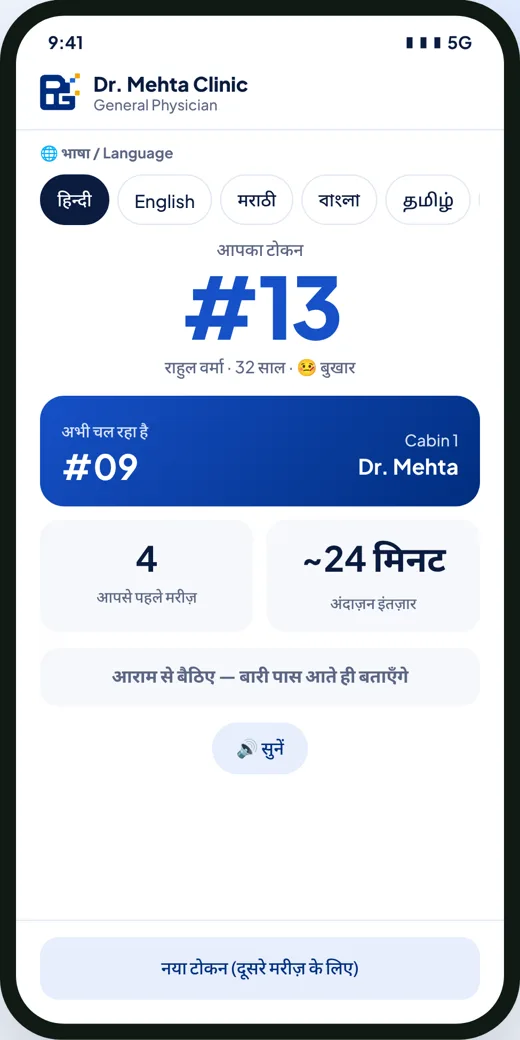
Patients scan the clinic's QR code, choose their language and get a token in seconds. Their phone shows how many patients are ahead and roughly how long they'll wait. The doctor or reception moves the queue with one button.
- Setup in 1 day
- 14-day free trial
- No app for patients
- 13 Indian languages
The problem
A normal day, without and with Smart Clinic Queue.
- 9:30 am
Today:OPD opens. Fifteen patients crowd the reception, each asking who is first.
With it:Patients scan the QR at the door and get a token. The order is clear from the first minute.
- 11:00 am
Today:“How much longer?” for the twentieth time, while the phone keeps ringing.
With it:Every patient sees how many are ahead and the expected wait on their own phone.
- 12:30 pm
Today:An argument at the counter: “I came before him!”
With it:The token number decides. Nobody argues with a number.
- 5:00 pm
Today:Elderly patients stand in a crowded room for an hour.
With it:Patients wait outside or nearby; their phone alerts them when their turn comes.
The cost
How much time does the queue cost you?
Put in your own numbers. This counts only the time spent answering queue questions and sorting out the order.
26 working days a month. The starting numbers are only an example; move the sliders to your own. This is an estimate from your numbers, not a promise.
35
hours
of reception time a month goes on the queue
≈ 4.3 full working days
The fix
How it works.
- 01
Put up the QR poster
Place it at the reception or entrance.
- 02
Patient takes a token
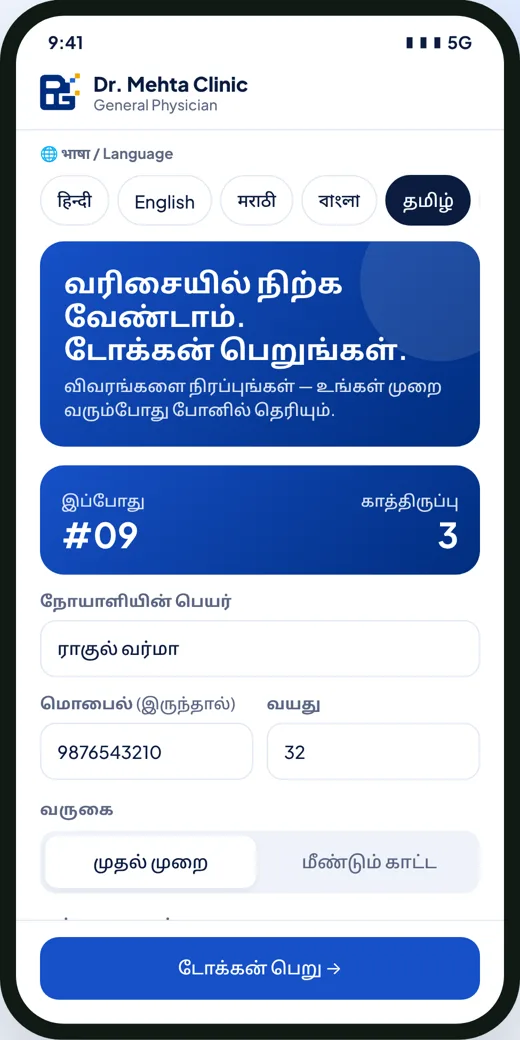
They pick their language, enter name and age, and get a token number.
- 03
Live wait on the phone
Patients see how many are ahead and the estimated wait, updated automatically.
- 04
“Next patient”
The doctor or reception presses one button; the patient's phone alerts them.
Why Smart Clinic Queue
What changes for you.
A calmer waiting room
Patients know their number and their wait, so the crowd at the counter goes away.
Reception gets its day back
Staff stop answering the same question and spend that time on billing, files and patients.
Fair for every patient
First come, first served, visible to everyone. Fewer arguments, fewer complaints.
Works for every patient
13 Indian languages, picture buttons and a listen button. No smartphone? Staff add them in one tap.
See it in use.
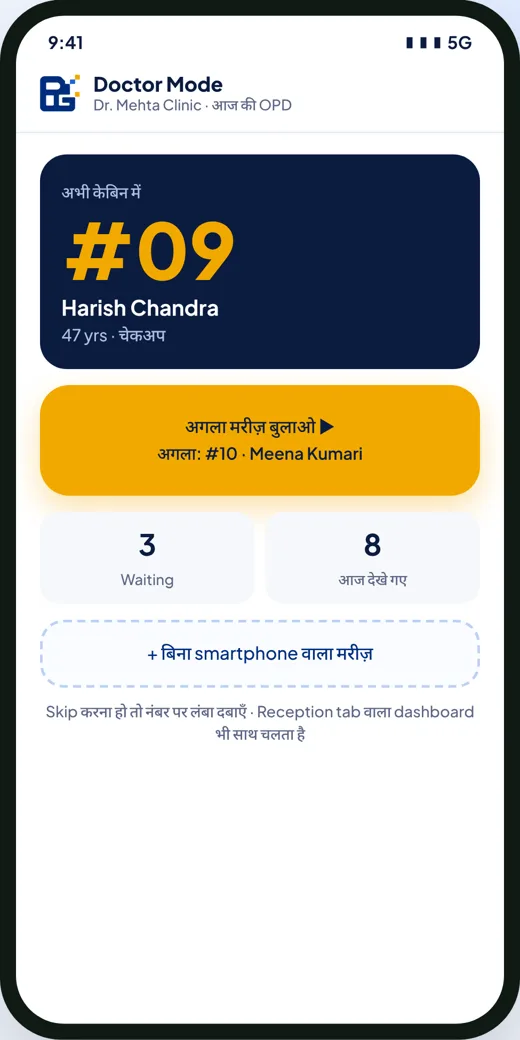
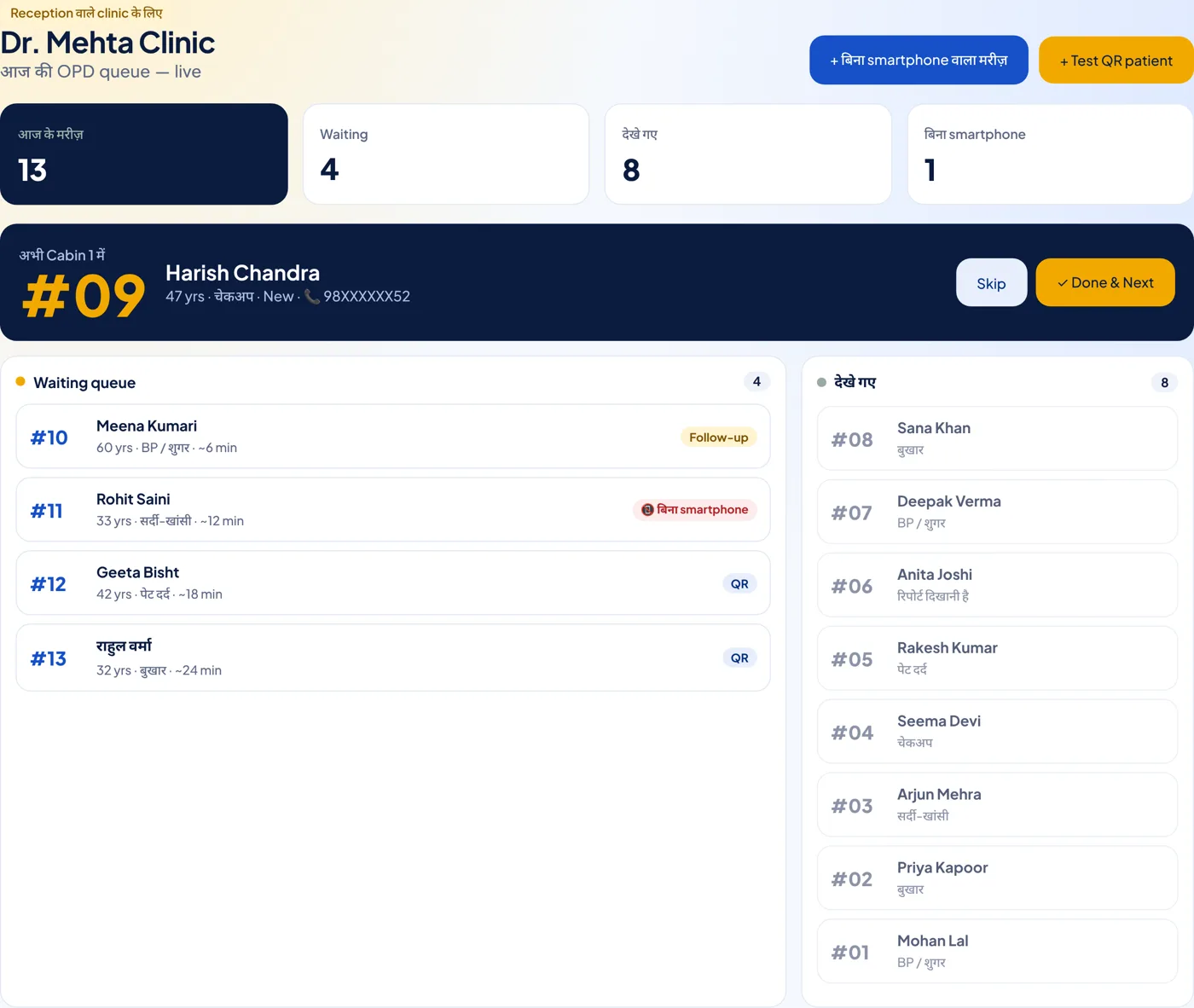
Screens from the real app.
Your options
Compared with what you use today.
Patient sees the live wait on their phone
- Smart Clinic Queue
- Yes
- Register and paper tokens
- No
- Hospital software
- Rarely
No app download for patients
- Smart Clinic Queue
- Yes
- Register and paper tokens
- Yes
- Hospital software
- Often needs an app
Indian languages for patients
- Smart Clinic Queue
- 13 languages
- Register and paper tokens
- No
- Hospital software
- Rarely
Runs without a receptionist
- Smart Clinic Queue
- Doctor Mode
- Register and paper tokens
- No
- Hospital software
- No
Setup time
- Smart Clinic Queue
- 1 day, done by us
- Register and paper tokens
- None
- Hospital software
- Weeks
Cost
- Smart Clinic Queue
- Low monthly fee, ask us
- Register and paper tokens
- Free, but the crowd stays
- Hospital software
- Much higher
Why buy from us
Software is half the job. We do the other half.
We set it up for you
Your account, your starting data and a 15-minute staff training, done in one day. You don't configure anything.
A real person on WhatsApp
Support comes from the team that builds the product, in Hindi or English. No ticket queue.
No lock-in
No long contracts. If it stops being useful, you can stop anytime.
Made for Indian counters
Hindi-first screens, works in any phone browser, built for small teams and busy days.
Your data stays yours
Only your account can see your customers' details. We don't sell or share them, and each product page says how long data is kept.
Built with you
Small products, improved from what owners tell us. Features marked coming soon are added as they launch.
Try it free for 14 days.
We set it up and train your staff. Use it on real patients for two weeks. No card, no contract. If it doesn't fit, you simply stop.
Plans.
Four plans per clinic. Book a free demo and we'll share the price for the plan that fits you.
Basic
For small clinics and single doctors
- QR token and live status
- Doctor Mode
- Reception dashboard
- Tokens for patients without smartphones
- 13 Indian languages
- QR poster, setup and staff training
Plus
For clinics with a waiting room
- Everything in Basic
- Waiting-room TV screen
- Voice announcement of the token number
- Token slip printing
- Priority WhatsApp support
Pro
For larger clinics and multiple doctors
- Everything in Plus
- Separate queues for multiple doctors or cabinsComing soon
- SMS / WhatsApp alerts to patientsComing soon
- Daily and monthly reportsComing soon
- Dedicated setup call
Custom
For hospitals, clinic chains or special workflows
- Everything in Pro
- Several branches under one account
- Features and reports built around your workflow
- Integration with the software you already use
- Dedicated onboarding and support
Who it is for.
Clinics with a reception
Reception runs the queue from the dashboard.
Single-doctor clinics
Doctor Mode on the doctor's phone, no reception needed.
Busy OPDs with a waiting room
A TV screen with voice announcement of the token number.
Everything included.
QR token, no app download
Opens in the phone's browser. Nothing to install.
Live status on the patient's phone
Patients ahead, estimated wait and a “your turn” alert.
13 Indian languages
हिन्दी, English, मराठी, বাংলা, தமிழ், తెలుగు, ગુજરાતી, ಕನ್ನಡ, മലയാളം, ਪੰਜਾਬੀ, ଓଡ଼ିଆ, অসমীয়া, اردو. Picture buttons and a listen button for patients who read less.
Doctor Mode
One big “next patient” button on the doctor's phone. No reception needed.
Reception dashboard
Full queue, Done & Next, Skip, call a patient early, cancel.
Patients without a smartphone
Staff add them in one tap and give them the token number.
Privacy
Patients give consent before taking a token, and patient data is deleted automatically after 30 days.
Smart Clinic Queue questions.
No. They scan the QR and the page opens in their phone's browser.
Staff add them in one tap and tell them their token number. A token slip can also be printed.
Yes. In Doctor Mode the doctor runs the queue from their phone with one button.
No. It works fully without a TV. A waiting-room TV screen with voice announcements is available if you want one.
Only the details needed for the queue are collected, patients give consent first, and data is deleted automatically after 30 days.
One day. We create the clinic account, send the QR poster and train the staff in 15 minutes.
It depends on the size of your clinic and the features you need. Send an enquiry on this page and we will share the pricing.
See it in your clinic
Book a free 15-minute demo.
We show you Smart Clinic Queue on a real phone, answer your questions and, if it fits, set up your clinic in a day.